
DOP-C02 CloudFormation
Infrastructure as Code
- Same concept as K8S
- Each resources is tagged, so can be easily tracked in cost management
- Saving strategy: automatically delete the DEV env at 5pm and recreate at 8am
- Automated generate of infrastructure diagram
- Separation of concerns
- VPC stack
- Network stack
- App stack
- Leverage existing templates on the web
- Templates must be uploaded to S3 as CloudFormation only reads from S3
- Delete the stack will delete everything created by that stack
- we can manually upload the new template, or use AWS CLI or CD tool to upload the template file
CloudFormation Components
-
AWSTemplateFormatVersion
- identifies the capabilities of the template “2010-09-09”
-
Description
- comments about the template
-
Resources (MANDATORY)
- your AWS resources declared in the template
- Documentations: https://docs.aws.amazon.com/AWSCloudFormation/latest/TemplateReference/aws-template-resource-type-ref.html
- form: service-provider::service-name::data-type-name
-
Parameters
- the dynamic inputs for your template
-
Parameters: SecurityGroupDescription: Description: Security Group Description Type: String AllowedValues: - Value1 - Value2 Default: Value1 NoEcho: true - AllowedValues, NoEcho
-
Mappings
- the static variables for your template
- hardcoded within the template
- use Fn::FindInMap or !FindInMap to return a named value from a specific key
-
Mappings:
  Mapping01:
    Key01:
      Name: Value01
    Key02:
      Name: Value02
    Key03:
      Name: Value03
  RegionMap:
    us-east-1:
      HVM64: ami-123
      HVMG2: ami-456
Resources
  MyEC2Instance
    Type: AWS::EC2::Instance
    Properties:
      ImageId: !FindInMap [RegionMap, !Ref "AWS::Region", HVM64]
      InstanceType: t2.micro
-
Outputs
- references to what has been created
- optional values that we can import into other stacks (if export it)
- ex). VPC_ID from a VPC Stack
-
Outputs: StackSSHSecurityGroup: Description: The SSH Security Group for our Company Value: !Ref MyCompanyWideSSHSecurityGroup Export: Name: SSHSecurityGroup - To import this value from another stack:
-
Resources:
  MySecureInstance:
    Type: AWS::EC2::Instance
    Properties:
      ImageId: ami-08123
      InstanceType: t2.micro
      AvailabilityZone: us-east-1a
      SecurityGroups:
        - !ImportValue SSHSecurityGroup
-
Conditionals
- list of conditions to perform resource creation
- used to control the creation of resources or outputs based on a condition
-
Conditions: CreateProdResources: !Equals [ !Ref EnvType, prod ] Resources: MountPoint: Type: AWS::EC2::VolumeAttachment Condition: CreateProdResources - Fn::And, Fn::Equals, Fn::If, Fn::Not, Fn::Or
CloudFormation Helpers
- References
- Fn::Ref or !Ref
-
Resources:
  DBSubnet1:
    Type: AWS::EC2::Subnet
    Properties:
      VpcId: !Ref MyVPC
- Functions
- Fn::Ref or !Ref
- references parameters or resources
-
Resources:
  DBSubnet1:
    Type: AWS::EC2::Subnet
    Properties:
      VpcId: !Ref MyVPC
- Fn::GetAtt
-
Resources:
  EC2Instance:
    Type: AWS::EC2::Instance
    Properties:
      ImageId: ami-1234
      InstanceType: t2.micro
  EBSVolume:
    Type: AWS::EC2::Volume
    Condition: CreateProdResources
    Properties:
      Size: 100
      AvailabilityZone: !GetAtt EC2Instance.AvailabilityZone
-
- Fn::FindInMap
- Fn::ImportValue
- Fn::Join
- Fn::Sub
- Fn::ForEach
- Fn::ToJsonString
- Fn::Base64
- Fn::Cidr
- Fn::GetAZs
- Fn::Select
- Fn::Split
- Fn::Transform
- Fn::Length
- Condition Functions from above
- Fn::Ref or !Ref
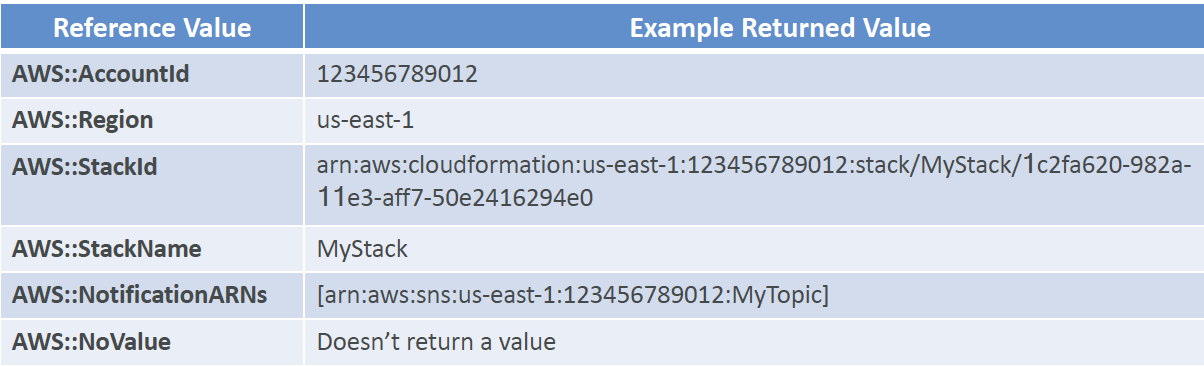
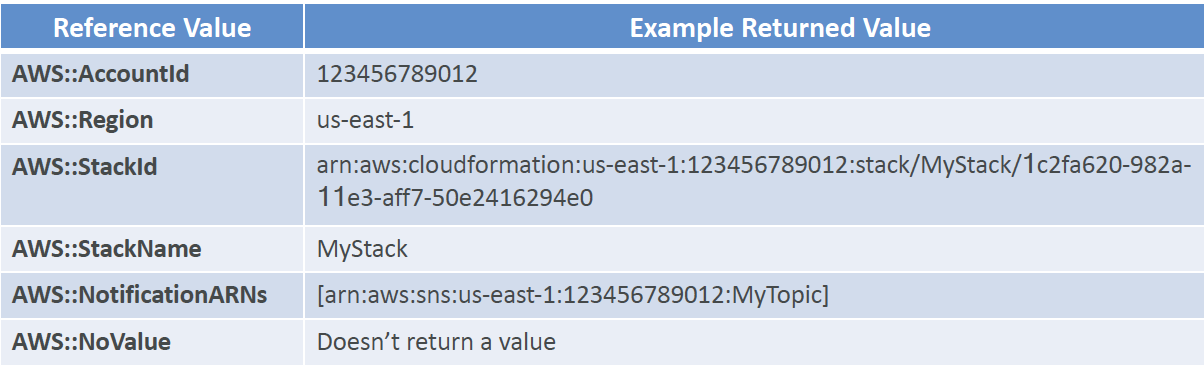
CloudFormation Pseudo Parameters
- enabled by default
-
CloudFormation - Rollbacks
- For stack creation:
- default: everything rolls back (gets deleted)
- option to disable rollback and trouble shoot what happened
- For stack update:
- default: previous known working state
- ability to see in the log
- If rollback failed:
- fix resources manually, then issue ContinueUpdateRollback API from console or CLI
CloudFormation - Service Role
- Give CloudFormation the necessary roles to create/delete/update resources on your behave
- iam:PassRole permission: to pass a service role to CloudFormation, the user triggering CloudFormation doesn't necessarily have the required permissions
CloudFormation - Capabilities
- CAPABILITY_NAMED_IAM and CAPABILITY_IAM
- needed to create or update IAM resources (IAM user, role, group, policy, access keys, etc)
- CAPABILITY_AUTO_EXPAND
- needed when the CloudFormation template includes Macros or Nested Stacks to perform dynamic transformations
- basically acknowledging that the template may change before deploying
- InsufficientCapabilitiesException
- throws if the capabilities haven't been acknowledged when deploying a template (security measure)
CloudFormation - DeletionPolicy
- DeletionPolicy=Delete
- DeletionPolicy=Retain
- DeletionPolicy=Snapshot
CloudFormation - Stack Policies
- a JSON document that defined the update actions allowed on specific resources during stack updates
- protects from unintentional updates
- when a Stack Policy is set, all resources in the Stack are protected by default
- specify an explicit ALLOW for the resources you want to be allowed to update
CloudFormation - Termination Protection
- use TerminationProtection to prevent accidental deletes
CloudFormation - Custom Resources
- backed by a Lambda function, or an SNS topic
-
Resources: MyCustomResourceUsingLambda: Type: Custom::MyLambdaResource Properties: ServiceToken: arn:aws:lambda:REGION:ACCOUNT_ID:function:FUNCTION_NAME ExampleProperty: "ExampleValue" - use case: delete content from an S3 bucket
- uses presigned S3 upload URL, and pass to custom resources so they can upload instruction yaml files to target S3 location, the CloudFormation listens to that location
CloudFormation - Dynamic References
- references external values tored in Systems Manager Parameter Store and Secrets Manager
- values are retrieved during create/update/delete operations
- Supports:
- ssm
-
Resources:
  S3Bucket:
    Type: AWS::S3::Bucket
    Properties:
      AccessControl: '{{resolve::ssm:S3AccessControl:2}}'
-
- ssm-secure
-
Resources:
  IAMUser:
    Type: AWS::IAM::User
    Properties:
      UserName: john
      LoginProfile:
        Password: '{{resolve::ssm-secure:IAMUserPassword:10}}'
-
- secretsmanager
-
Resources:
  DBInstance:
    Type: AWS::RDS::DBInstance
    Properties:
      DBName: MyRDSInstance
      MasterUsername: '{{resolve:secretsmanager:MyRDSSecret:SecretString:username}}'
      MasterUserPassword: '{{resolve::secretsmanager:MyRDSSecret:SecretString:password}}'
-
- ssm
CloudFormation - Secrets Manager & RDS Option1
- ManageMasterUserPassword: creates admin secret implicitly
-
Resources:
  MyCluster:
    Type: AWS::RDS::DBCluster
    Properties:
      Engine: aurora-mysql
      MasterUsername: masteruser
      ManageMasterUserPassword: true
Outputs:
  Secret:
    Value: !GetAttr MyCluster.MasterUserSecret.SecretArn
CloudFormation - Secrets Manager & RDS Option 2
- Create secrets manager and dynamic reference
-
# generate secret:
Resources:
  MyDatabaseSecret:
    Type: AWS::SecretsManager::Secret
    Properties:
      Name: MyDatabaseSecret
      GenerateSecretString:
        SecretStringTemplate: '{"username": "admin"}'
        ...

# Reference secret in RDS DB instance
  MyDBInstance:
    Type: AWS::RDS::DBInstance
    Properties:
      DBName: mydatabase
      AllocatedStorage: 20
      DBInstanceClass: db.t2.micro
      Engine: mysql
      MasterUsername: '{{resolve:secretsmanager:MyDatabaseSecret:SecretString:username}}'
      MasterUserPassword: '{{resolve:secretsmanager:MyDatabaseSecret:SecretString:password}}'

# Link the secret
  SecretRDSAttachement:
    Type: AWS::SecretsManager::SecretTargetAttachment
    Properties:
      SecretId: !Ref MyDatabaseSecret
      TargetId: !Ref MyDBInstance
      TargetType: AWS::RDS::DBInstance
CloudFormation - User Data
- provide configuration scripts to EC2 when it is first launched
- base64 encode
- CloudFormation Helper Scripts
- python scripts, come directly on Amazon Linux AMIs
- cfn-init, cfn-signal, cfn-get-metadata, cfn-hup
CloudFormation - AWS::CloudFormation::Init
- a config contains the following and is executed in that order
-
Resources:
  EC2Instance:
    Type: AWS::EC2::Instance
    Properties:
      ...
    Metadata:
      AWS::CloudFormation::Init:
        config:
            packages: ...
            groups: ...
            users: ...
            sources: ...
            files: ...
            commands: ...
            services: ...
CloudFormation - cfn-init
- used to retrieve and interpret the resource metadata, installing packages, creating files and starting services
- helps make complex EC2 configurations readable
- the EC2 instance will query the CloudFormation service to get init data
- AWS::CloudFormation::Init must be in the Metadata of a resource
- Logs go to /var/log/cfn-init.log
CloudFormation - cfn-signal
- run cfn-signal right after cfn-init
- tell CloudFormation service that the resource creation success/fail to keep on going or fail
- needs to define WaitCondition
- If Wait Condition didn't receive the required number of signals from an Amazon EC2 Instance
- ensure the AMI has the AWS CloudFormation helper scripts installed
- verify that the cfn-init & cfn-signal command was successfully run on the instance
- view logs: /var/log/cloud-init.log, /var/log/cfn-init.log
- verify the instance has a connection to the Internet
Cloud Formation - Nested Stacks
- nested stacks are considered best practice
- always update hte root stack, not the child stack
Cloud Formation - DependsOn
- like dockerfile's depends on
- applied automatically when using !Ref and !GetAtt
Cloud Formation - StackSets
- works on stacks across multiple accounts and regions
Cloud Formation - StackSets Permission Models
- later
Cloud Formation - Troubleshooting
- DELETE_FAILED
- some resources must be emptied
- Security group cannot be deleted until all EC2 instances in the group are deleted
- UPDTE_ROLLBACK_FAILED
- resources changed outside of CloudFormation, insufficient permissions, ASG that doesn't receive enough signals...
- manually fix the error, and then ContinueUpdateRollback
Cloud Formation - StackSet Troubleshooting
- A stack operation failed, stack instance status is OUTDATED
- insufficient permissions
- template could be trying to create global resources that must be unique but aren't
- admin account doesn't have a trust relationship with the target account
- reached a limit or a quota
Cloud Formation - ChangeSets
- when update a stack, need to know what changes will happend before applying them
- ChangeSets won't say if the udpate will be successful
Cloud Formation - cfn-hup
- can be used to tell EC2 instance to look for metadata changes every 15 mins and apply the metadata configuration again
- /etc/cfn/cfn-hup.conf and /etc/cfn/hooks.d/cfn-auto-reloader.conf
Cloud Formation - Drift
- used to detect manual changes that "drifts" the configuration away from uploaded yaml
- Current state == expected state?
AWS Service Catalog
- admin sets a list of service that AWS users are allowed to use (in the CloudFormation, or other services)
- admin createse a "portfolio" of service that users are allowed to use
- each product is a CloudFormation template
- standardization in tagging, standardization in ways services are configured, etc.