
DOP-C02 CloudFormation
Infrastructure as Code
- Same concept as K8S
- Each resources is tagged, so can be easily tracked in cost management
- Saving strategy: automatically delete the DEV env at 5pm and recreate at 8am
- Automated generate of infrastructure diagram
- Separation of concerns
- VPC stack
- Network stack
- App stack
- Leverage existing templates on the web
- Templates must be uploaded to S3 as CloudFormation only reads from S3
- Delete the stack will delete everything created by that stack
- we can manually upload the new template, or use AWS CLI or CD tool to upload the template file
CloudFormation Components
-
AWSTemplateFormatVersion
- identifies the capabilities of the template “2010-09-09”
-
Description
- comments about the template
-
Resources (MANDATORY)
- your AWS resources declared in the template
- Documentations: https://docs.aws.amazon.com/AWSCloudFormation/latest/TemplateReference/aws-template-resource-type-ref.html
- form: service-provider::service-name::data-type-name
-
Parameters
- the dynamic inputs for your template
-
Parameters: SecurityGroupDescription: Description: Security Group Description Type: String AllowedValues: - Value1 - Value2 Default: Value1 NoEcho: true - AllowedValues, NoEcho
-
Mappings
- the static variables for your template
- hardcoded within the template
- use Fn::FindInMap or !FindInMap to return a named value from a specific key
-
Mappings:
  Mapping01:
    Key01:
      Name: Value01
    Key02:
      Name: Value02
    Key03:
      Name: Value03
  RegionMap:
    us-east-1:
      HVM64: ami-123
      HVMG2: ami-456
Resources
  MyEC2Instance
    Type: AWS::EC2::Instance
    Properties:
      ImageId: !FindInMap [RegionMap, !Ref "AWS::Region", HVM64]
      InstanceType: t2.micro
-
Outputs
- references to what has been created
- optional values that we can import into other stacks (if export it)
- ex). VPC_ID from a VPC Stack
-
Outputs: StackSSHSecurityGroup: Description: The SSH Security Group for our Company Value: !Ref MyCompanyWideSSHSecurityGroup Export: Name: SSHSecurityGroup - To import this value from another stack:
-
Resources:
  MySecureInstance:
    Type: AWS::EC2::Instance
    Properties:
      ImageId: ami-08123
      InstanceType: t2.micro
      AvailabilityZone: us-east-1a
      SecurityGroups:
        - !ImportValue SSHSecurityGroup
-
Conditionals
- list of conditions to perform resource creation
- used to control the creation of resources or outputs based on a condition
-
Conditions: CreateProdResources: !Equals [ !Ref EnvType, prod ] Resources: MountPoint: Type: AWS::EC2::VolumeAttachment Condition: CreateProdResources - Fn::And, Fn::Equals, Fn::If, Fn::Not, Fn::Or
CloudFormation Helpers
- References
- Fn::Ref or !Ref
-
Resources:
  DBSubnet1:
    Type: AWS::EC2::Subnet
    Properties:
      VpcId: !Ref MyVPC
- Functions
- Fn::Ref or !Ref
- references parameters or resources
-
Resources:
  DBSubnet1:
    Type: AWS::EC2::Subnet
    Properties:
      VpcId: !Ref MyVPC
- Fn::GetAtt
-
Resources:
  EC2Instance:
    Type: AWS::EC2::Instance
    Properties:
      ImageId: ami-1234
      InstanceType: t2.micro
  EBSVolume:
    Type: AWS::EC2::Volume
    Condition: CreateProdResources
    Properties:
      Size: 100
      AvailabilityZone: !GetAtt EC2Instance.AvailabilityZone
-
- Fn::FindInMap
- Fn::ImportValue
- Fn::Join
- Fn::Sub
- Fn::ForEach
- Fn::ToJsonString
- Fn::Base64
- Fn::Cidr
- Fn::GetAZs
- Fn::Select
- Fn::Split
- Fn::Transform
- Fn::Length
- Condition Functions from above
- Fn::Ref or !Ref
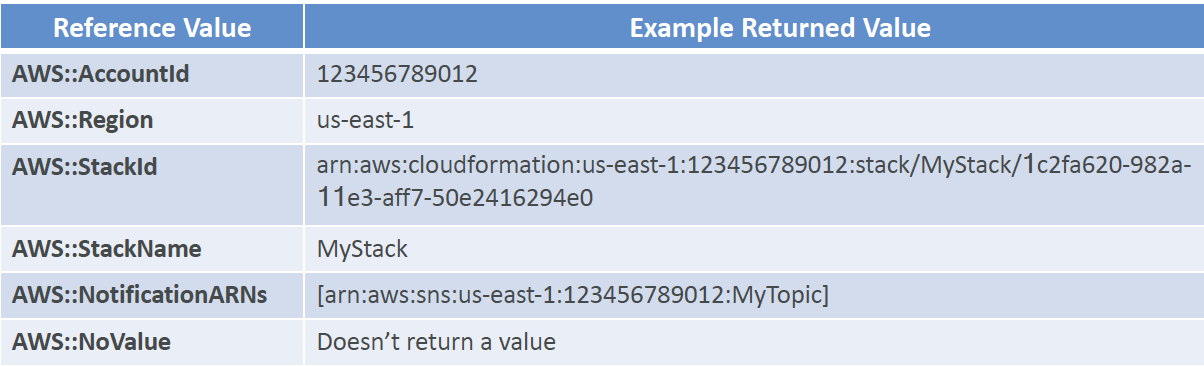
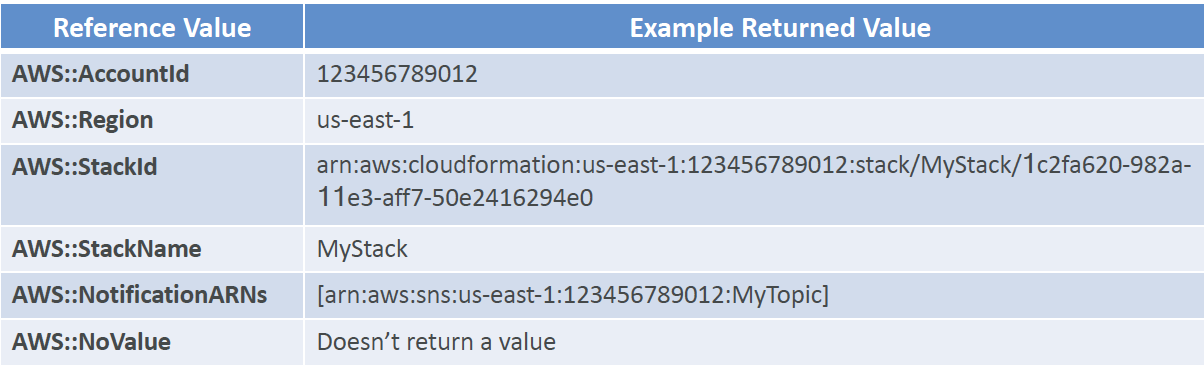
CloudFormation Pseudo Parameters
- enabled by default
-
CloudFormation - Rollbacks
- For stack creation:
- default: everything rolls back (gets deleted)
- option to disable rollback and trouble shoot what happened
- For stack update:
- default: previous known working state
- ability to see in the log
- If rollback failed:
- fix resources manually, then issue ContinueUpdateRollback API from console or CLI